StreamsApp compared with a spreadsheet
A spreadsheet lets you type Done
A spreadsheet stops working at a specific point, and it is worth being precise about where that point is.
Side by side
Product features change. Check anything here against a spreadsheet before you decide.
Can somebody mark work complete that is not complete?
- a spreadsheet
- Yes. The status column is free text. Nothing checks it.
- StreamsApp
- Only where you have asked for nothing. Mark a field required on a stage and the job cannot leave until that field has a value.
Where are the instructions for the work?
- a spreadsheet
- In somebody's head, or a document in another folder.
- StreamsApp
- On the stage itself, read while the work is being done.
Who changed that cell, and when?
- a spreadsheet
- Version history if you are lucky and the file is in the cloud.
- StreamsApp
- Every field edit and stage move logged with the person, the time, and the before and after.
Can two people work on it at once without overwriting each other?
- a spreadsheet
- Usually, until somebody sorts a column or opens a local copy.
- StreamsApp
- Yes. Rows are records, not cells, and there is no shared grid to sort out from under you.
Can the customer be quoted and invoiced from it?
- a spreadsheet
- No. Copy the details into another system.
- StreamsApp
- Quote from the job, customer accepts online, one click to an invoice, syncs to Xero.
Can different people see different things?
- a spreadsheet
- Only by keeping separate files, which is how the copies start.
- StreamsApp
- Per stage: work on it, see it but not change it, or not see it at all.
The failure is always the same
The spreadsheet does not fail by breaking. It fails by being confidently wrong. Somebody types Done because the job is nearly done, or because they are about to finish it, or because they meant to and got interrupted.
A week later the sheet says the job is finished, and the certificate was never uploaded, or the customer was never invoiced. Nobody lied. The tool simply had no way to tell the difference between work being done and someone saying it was.
That is the one thing a stage with a gate does that a status column cannot. It does not ask whether the work is done. It asks for the thing the work produces, and if that is not there, the job stays where it is.
You do not have to start over
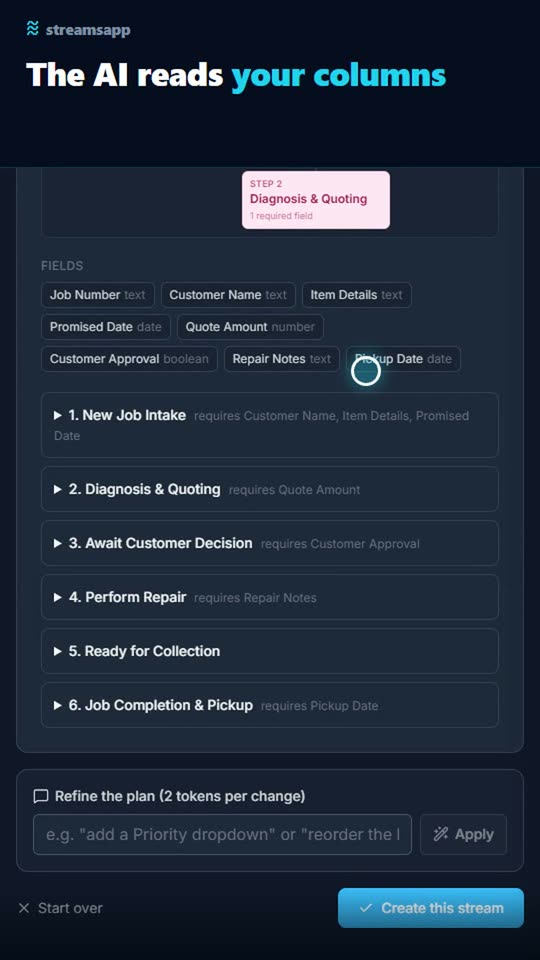
Upload the spreadsheet you are running on now. The columns become fields with types worked out from the data, and the status column becomes the stages. You get a proposed process back, you fix what it got wrong, and you create it.
Then bring the rows across as records. What you have been maintaining by hand becomes the starting state, rather than something you retype.
How much of this you switch on is up to you
Nothing here is required until you say so. A new stream starts with no requirements at all, and a stage that asks for nothing lets a job straight through.
Most businesses end up running both kinds side by side. A compliance job can insist on the slab certificate, so it cannot reach the frame stage without one. A sales enquiry in the same account can have nothing required at all, because chasing a lead is not a process and a rule there is only friction.
That is the real difference. Not that the software is strict, but that you get to decide where it is, one stage at a time, and change your mind later without starting again.
See the difference
Drop the spreadsheet you already run on into Streams. The AI reads your columns, works out the process behind them and builds it. Then bring the rows across and hand each job to whoever is doing it.
Questions
- Can I import my existing spreadsheet?
- Yes, twice over. Upload it once to have the process itself proposed from your columns and status values, then import the rows as records with the columns mapped to fields. Up to 1,000 rows per import.
- Do I lose the ability to do calculations?
- Number fields can be summed or averaged on a stream's dashboard, and everything exports to CSV whenever you want it, so the numbers are always yours to model.
- What if my process changes?
- Change the stages, rename fields, add or remove requirements whenever you like. Existing records keep working. A template or an imported process is a starting point, not a lock-in.
See it for your kind of work
Other comparisons
Try it against your own process
The free plan is enough to put a real job through end to end and find out for yourself. No credit card, and nothing to uninstall if it is not for you.
Get started free