For repair shops
Nothing leaves the bench unbilled
The two things that actually cost a repair shop money are work done without approval and work delivered without an invoice. Both happen quietly, and both are a process problem rather than a people problem.
No repair without approval
The bench stage cannot be reached until the customer has accepted the quote.
No close without an invoice
Choose raised or paid in full. Drafts and voided invoices do not satisfy it.
Messages on the job
Email, SMS and WhatsApp from the record, and replies come back to it.
Straight into your books
Xero, MYOB or QuickBooks, with GST calculated the way they calculate it.
Book in, diagnose, quote, approve, repair, invoice
Every job moves down the same stages, and each stage asks for what it needs. Book-in wants the customer, the item and the fault as described. Diagnosis wants what you actually found. Quoting wants the figure. Approval wants the customer's yes.
The job cannot reach the bench until the customer has approved. Not because somebody remembered to check, but because the approval stage will not let go of the job until the quote has been accepted.
The customer approves in their own time
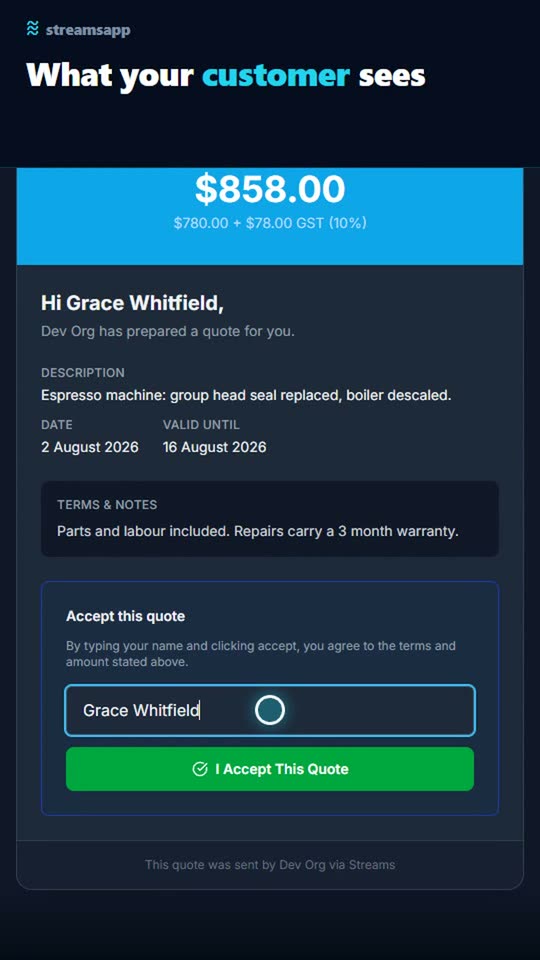
Raise the quote off the job, with the customer's details and the GST already on it. They get a link, read it, and accept it by typing their name. The acceptance is recorded with the time and their name against it, and it can move the job to the repair stage by itself.
No phone tag, no 'I never agreed to that' six weeks later. The approval is on the job, in writing, with a timestamp.
Closed means billed
Convert the accepted quote into an invoice in one click, at the figure the customer agreed to. Send it with the PDF attached. Connect Xero, MYOB or QuickBooks and it lands there too.
Then put the gate on the last stage: a job cannot be marked complete until an invoice has been raised, or until it has been paid in full, whichever you choose. A draft invoice does not count. A voided one does not count. The only way to close the job is to have actually billed it.
Tell the customer without leaving the job
Email, text or WhatsApp the customer from the job itself. When they reply, the reply comes back onto that job rather than into one person's inbox, with anything they attached saved onto the record.
You can make that a gate too. A job cannot leave the 'ready for collection' stage until the customer has actually been told.
Set a target number of days per stage and anything sitting too long is flagged, listed in the weekly summary, and emailed to whoever it belongs to.
See it happen
Raise a quote straight off the job, with the customer details and the GST filled in for you. They accept it online, it becomes an invoice in one click, and it goes into your accounting system. Nothing typed twice.
A starting point: the Repair Jobs template
Track repair jobs from drop-off through quote, approval, repair, and customer pickup. 7 stages and 12 fields, with written instructions on every stage. Change any of it, because it is your process.
Questions
- Can a customer approve a quote without creating an account?
- Yes. They get a link, read the quote with the tax broken out, and accept it by typing their name. Nothing to install and nothing to sign up for. The acceptance is recorded against the job with their name and the time.
- Can I stop a job being closed before it is invoiced?
- Yes. On the closing stage, require that an invoice has been raised or that it has been paid in full. Until that is genuinely true the job will not move, and the button tells the person exactly what is outstanding.
- Do customer replies come back to the job?
- Yes, for email, SMS and WhatsApp. Email is matched exactly, because every email sent from a job carries a reply address naming it, so the customer just hits reply. Attachments are saved onto the job.
- What does it cost to run a repair shop on this?
- The free plan covers two users, 500 jobs and 300 tokens a month, which is enough to run a real workload while you decide. Quotes and invoices cost 5 tokens each, an email costs 1 and a text costs 30. Paid plans start at $29 a month.
Weighing it up against
Other trades doing the same thing
Start with the free plan
Two users, 500 records and every feature switched on. No credit card, and your data stays in Australia.
Get started free