StreamsApp compared with Monday CRM
A Monday CRM alternative for small teams
This page is for a small business whose customer relationship is a process. Enquiry, quote, job, evidence, invoice, and sometimes claims or variations on top. For that shape, two things tend to decide it: whether the software holds the process, and what it costs when you are paying for every seat.
Side by side
Product features change. Check anything here against Monday CRM before you decide. Monday CRM prices and limits checked on 30 September 2026.
Can a deal or job move on before it has what the next stage needs?
- Monday CRM
- Status is a column. Anyone who can edit it can change it, and checking the item is ready is left to automations or convention.
- StreamsApp
- Not where you have said no. Mark a field required at a step and the record stays put until it has a value, and the person is told what is missing.
Is the process written down where the work happens?
- Monday CRM
- In the item's updates, a doc, or the board description.
- StreamsApp
- On each step, shown to whoever is working on it right then.
Can each process have its own shape?
- Monday CRM
- Yes. Each board has its own columns, and items can be connected across boards.
- StreamsApp
- Yes, as many streams as you like on every plan. One record is carried from stream to stream, and the Full Record reads its whole history as one timeline.
Is there a free plan?
- Monday CRM
- No. A 14-day trial.
- StreamsApp
- Yes. Free for two users with every plugin switched on, no card and no time limit.
How is it priced?
- Monday CRM
- Per seat, with a 3-seat minimum on every plan. Annual billing: Basic $19, Standard $27, Pro $45 AUD per seat per month. Ultimate on quote.
- StreamsApp
- Per organisation, no seat minimum. Basic $29 for 5 users, Standard $79 for 20, Pro $199 for 50, AUD per month.
Quotes and invoices?
- Monday CRM
- Built in, capped at 20 a month on Basic, 50 on Standard and 250 on Pro.
- StreamsApp
- Built in on every plan, including Free, with GST and sync to Xero, MYOB or QuickBooks. Each one draws 5 tokens from the monthly allowance: 5,000 on Basic, 20,000 on Standard.
Automations?
- Monday CRM
- None listed on Basic, 250 a month on Standard, 25,000 on Pro.
- StreamsApp
- On every plan. Email a customer or a colleague when a record reaches a step. An automated email uses 1 token.
Can I use it on my phone?
- Monday CRM
- iOS and Android apps from Standard up. Basic has none.
- StreamsApp
- Every plan, including Free, in any phone browser. Nothing to install. It needs a connection; there is no offline mode.
Can my customers log in?
- Monday CRM
- Not in Monday CRM itself. Guests can be invited to boards, and a customer portal exists in monday service, a separate product.
- StreamsApp
- Yes, without a password. Customers you switch on get a private link in your emails, follow their own jobs step by step, see only the fields you choose, and reply from the page. 30 tokens a month per customer.
What it costs a team of five, or twenty
Per-seat pricing is fine for three people and gets heavy fast. Five people on Monday CRM Basic is 5 x $19 = $95 AUD a month on annual billing. StreamsApp Basic covers the same five for $29.
Twenty people on Monday CRM Standard is 20 x $27 = $540 AUD a month on annual billing. StreamsApp Standard covers twenty for $79, and nobody has to decide whether the person in the workshop is worth a seat.
Monday's numbers are from its own pricing page, in AUD, on the date shown above. Check them yourself before you decide.
A CRM built from streams
Monday gives you a flexible board and lets you build the rules around it. StreamsApp starts from the process instead. Every process you run gets its own stream: a sales pipeline, customer onboarding, the repair job, the progress claim. Each has its own steps, fields, written instructions and rules, and they all point at the same contacts.
When a won deal becomes a job, the record is carried into the next stream, so the customer's whole history reads end to end. Where one job produces several of something, like progress claims against a build, sub-streams raise them against the parent with the parent still open.
And the step can refuse. Not a notification after the status changed, but the move itself declined until the proposal is attached, the certificate is uploaded or the invoice is raised.
How much of this you switch on is up to you
Nothing here is required until you say so. A new stream starts with no requirements at all, and a stage that asks for nothing lets a job straight through.
Most businesses end up running both kinds side by side. A compliance job can insist on the slab certificate, so it cannot reach the frame stage without one. A sales enquiry in the same account can have nothing required at all, because chasing a lead is not a process and a rule there is only friction.
That is the real difference. Not that the software is strict, but that you get to decide where it is, one stage at a time, and change your mind later without starting again.
See the difference
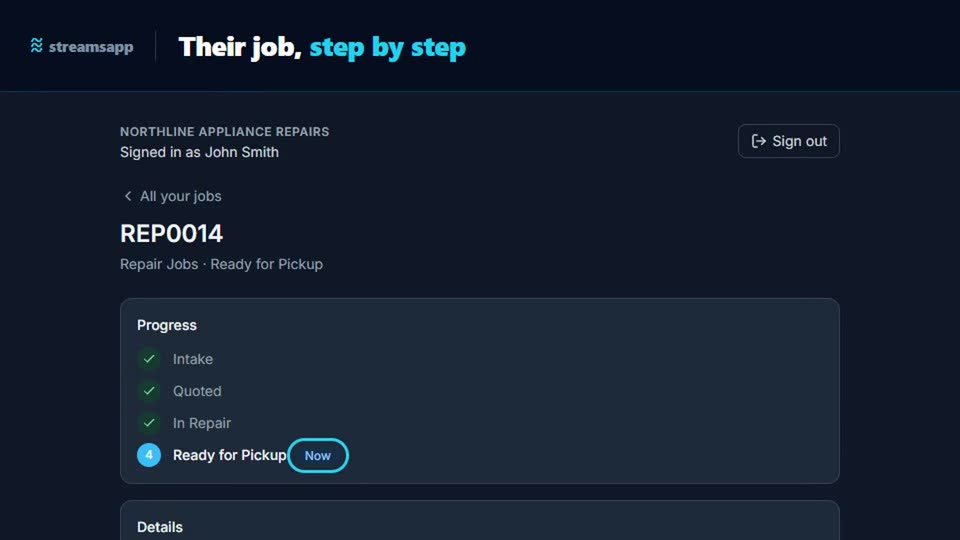
Turn the portal on for a stream, choose exactly which details customers see, and switch it on per customer. Every email you send from the job then carries a private link: no account, no password. They see the job step by step and can reply from the page, and the reply lands on the job.
What customers say
5.0 on Capterra2 reviews“If you're looking to systemise then Streams is for you”
Streams' ability to help us create and document processes and workflows has allowed us to centralise, systemise and manage workflows across more than 10 stores, directly resulting in increased sales. Its ability to streamline our workflows and aid with process creation is amazing, saving us days of work that we would previously have to do manually.
“Great way to streamline work process”
AI assistant is a great tool to help with setting up your workflow. Overall experience has been outstanding.
Questions
- Is StreamsApp a CRM?
- Yes. Contacts, custom fields, stages, automations, email, SMS and WhatsApp from the record with replies landing back on it, quotes, invoices and accounting sync. The difference is that every process gets its own stream instead of everything living in one pipeline of deals.
- Can I bring my Monday boards across?
- Export the board to Excel, save it as CSV and import it with the columns mapped to fields. You can also upload the spreadsheet itself and have the steps and fields proposed for you, then fix what it got wrong.
- Does it have a customer portal?
- Yes. Switch it on for a stream and for each customer, and every email you send them from a job carries a private link. They see their own jobs, how far along each one is and only the fields you tick, and they can reply from the page. Monday CRM on its own has guest access to boards; its customer portal is part of monday service, a separate product.
- Why is it not priced per seat?
- Because the people who most need to see the job, the ones doing it, are the ones a per-seat price pushes out. Plans include a number of users and a monthly token allowance for the things that cost us money to send, like SMS and invoices.
See it for your kind of work
Other comparisons
Try it against your own process
The free plan is enough to put a real job through end to end and find out for yourself. No credit card, and nothing to uninstall if it is not for you.
Get started free