The job can't move on
until the work is done.
Job tracking for Australian trades, repair shops and service teams. Quotes, invoices, customer messages and Xero in one place, and every step refuses to close until it has what it needs.
Free for 2 users. No credit card. Hosted in Australia. Or book a 15 minute walkthrough
Quick tour
See Streams in 60 seconds
From custom workflows to the Lake: a guided tour of the whole app.
See more demosHow it works
Your process, running itself
This is not a list of contacts to chase. It is the job itself, moving through the stages you set, in the order you set them.
Your process, as steps
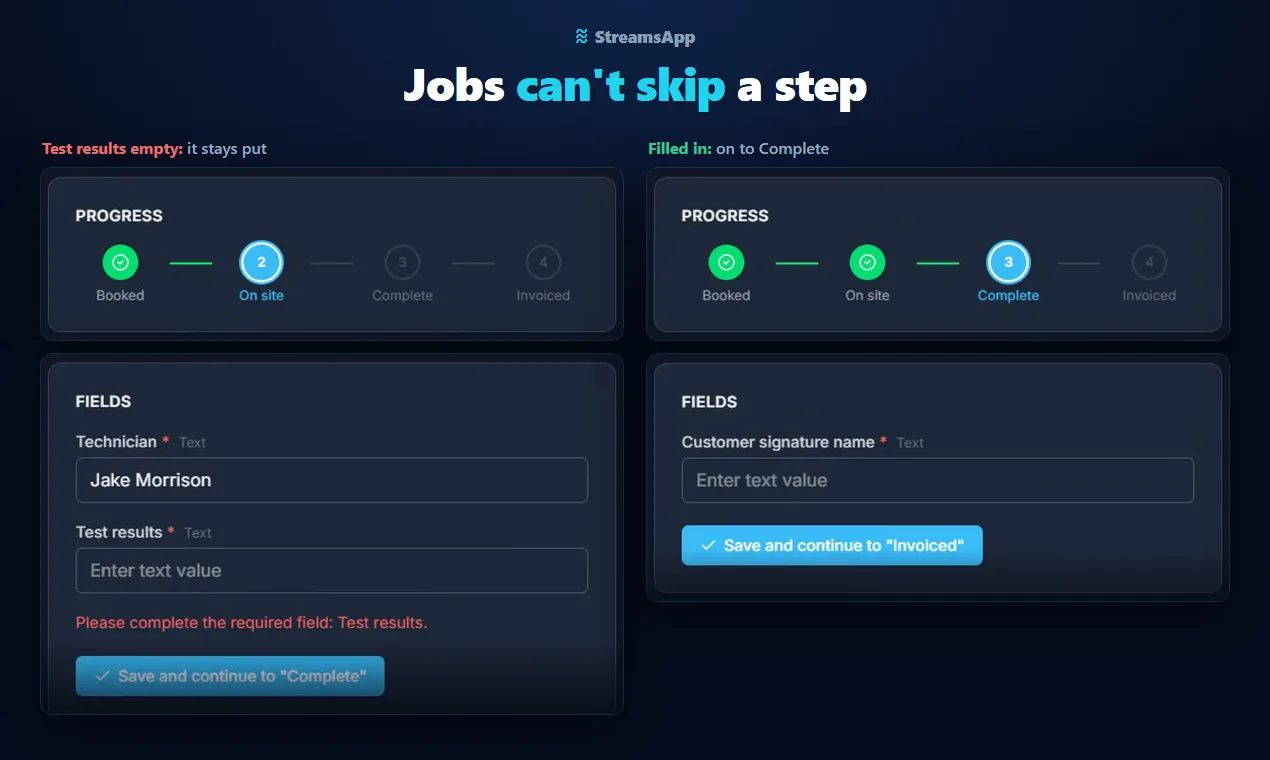
Set out the stages your team already follows: booked, on site, complete, invoiced. A job board, a sales pipeline, client onboarding, whatever the work is.
Each step has a gate
Mark the fields a step needs. Until they are filled in, the job stays where it is and the missing field is named, so nothing moves on half done.
Everything on one record
Fields, notes, quotes, invoices, emails, SMS and customer replies sit on the job itself, with every action logged.
Features
Everything your team needs
Job tracking, step documentation and gates, dashboards, a customer portal, plus email, SMS, document scanning, quotes and invoices. All of it on every plan.
Custom workflow steps
Design stages that match how you actually work, not a template you have to bend to.
Required field validation
Hold a job at a step until the information that step needs is actually there. No more work moving on half done.
Step documentation
Write what needs to happen at each step. Your team can reference it, and so can the built-in AI assistant.
Email & SMS built in
Send emails and text messages from any record, tracked against the contact. No copy-pasting between tools.
Quotes & proposals
Generate branded PDF quotes, send them by email, and get customers to accept online with a digital signature.
Document scanning
Snap a photo of a form, licence, or document and extract text directly into a record's fields with AI-powered OCR.
Dashboards
Jobs at each step, who has what, what is overdue and what has been invoiced, on one page your team lands on. Share it with staff without showing them anything they can't already see.
Customer portal
Customers follow their own jobs and reply to you from a private link in your emails. No passwords, and they only see the details you choose.
Replies land on the job
When a customer replies to an email, SMS or WhatsApp you sent from a record, the reply comes back onto that record, not into one person's inbox.
Milestone timeline
See planned dates and step transitions across every record on a Gantt-style timeline. Filter by stream, assignee, or record.
Full audit trail
Record moves, field edits, logins, plugin events. All logged with a timestamp and user. Export to CSV when you need it.
Accounting sync
Connect to Xero or QuickBooks from the Invoicing plugin. Invoices auto-sync to the accounting systems configured on each stream. No double-entry.
Use cases
Built for any team, any process
If your work moves through stages, Streams can run it.
Builders
Progress claims and variations against a contract, with the certificates gated
Manufacturers
Work orders from enquiry to invoice, beside the stock system you keep
Repair shops
Quote, approve, repair, invoice. Nothing closes before it is billed
Multi-site operations
One login per site, head office sees every store at once
Claims and warranty
Evidence required at each stage, not chased afterwards
Onboarding
The process lives in the work instead of in a 40-page document
Field service
Technicians get the step in front of them, customers get told
Maintenance requests
Every site reports in one place, and nothing is scheduled without a contractor
Safety inspections
No sign-off until every hazard has a corrective action
Customer support
No ticket closes without a fix, and replies land on the ticket
Property management
No tradie booked until the owner has approved the work
Events
Venue and suppliers confirmed before the event moves on
Music and tuition schools
No lessons until the consent form is in, and every trial followed up
Home care
Every client assessed before services start, and reviews on time
Cleaning businesses
No job marked done without the photos, and every clean checked before it is billed
Landscaping and gardening
Extra work quoted and accepted before it is dug
Pest control
Treatment recorded before the report goes out, and follow-ups that happen
IT support and MSPs
Every client's tickets in one queue, and no ticket closed without a fix
Analytics
Every stream flows into the Lake
Your streams don't just run the work. They feed the Lake, one place to understand every live record across all of them at once.
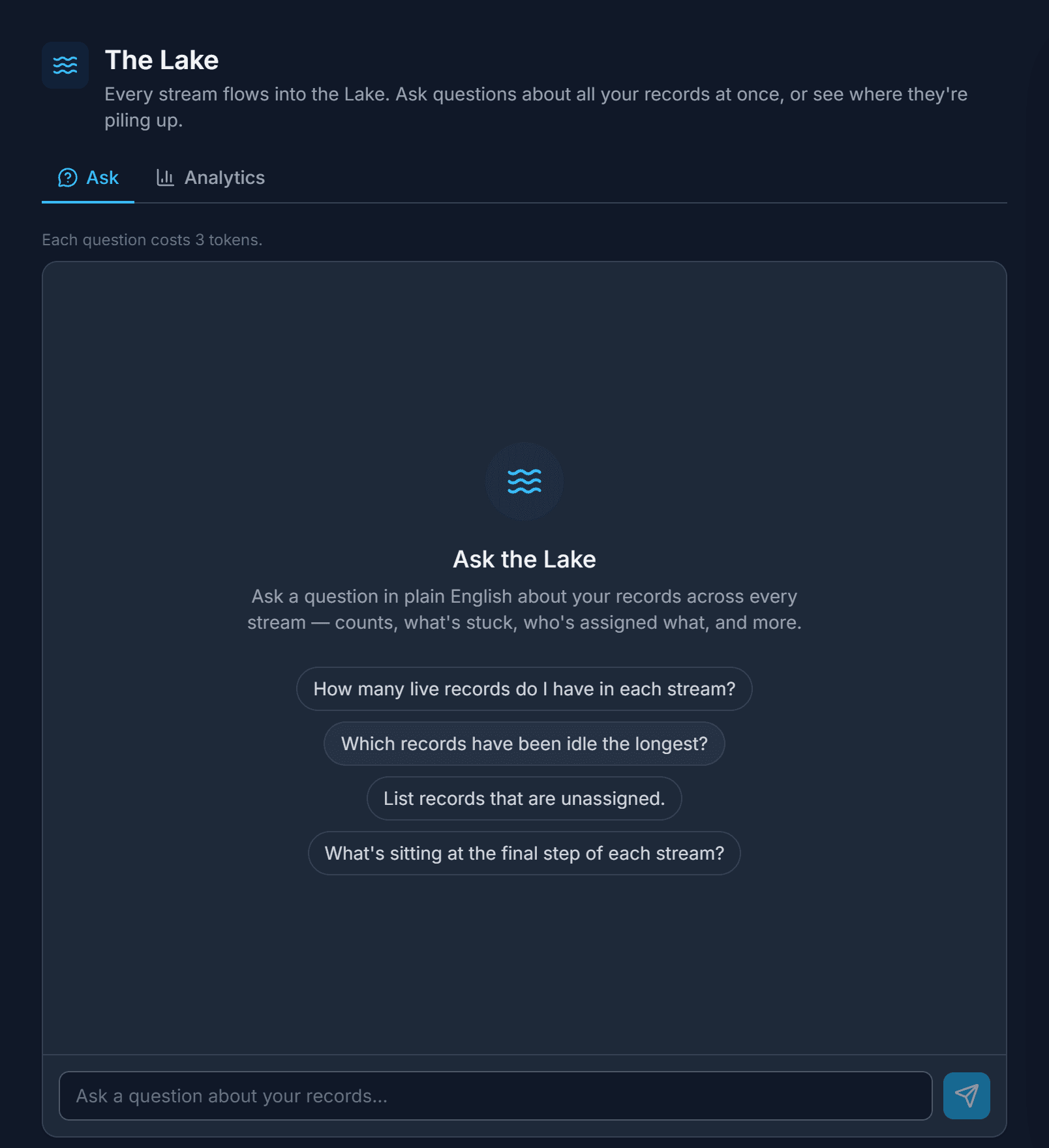
Ask in plain English
“Which records have been idle the longest?” “Who has the most unassigned jobs?” Ask the Lake and get an answer drawn only from your own records, with no filters or spreadsheets to build.
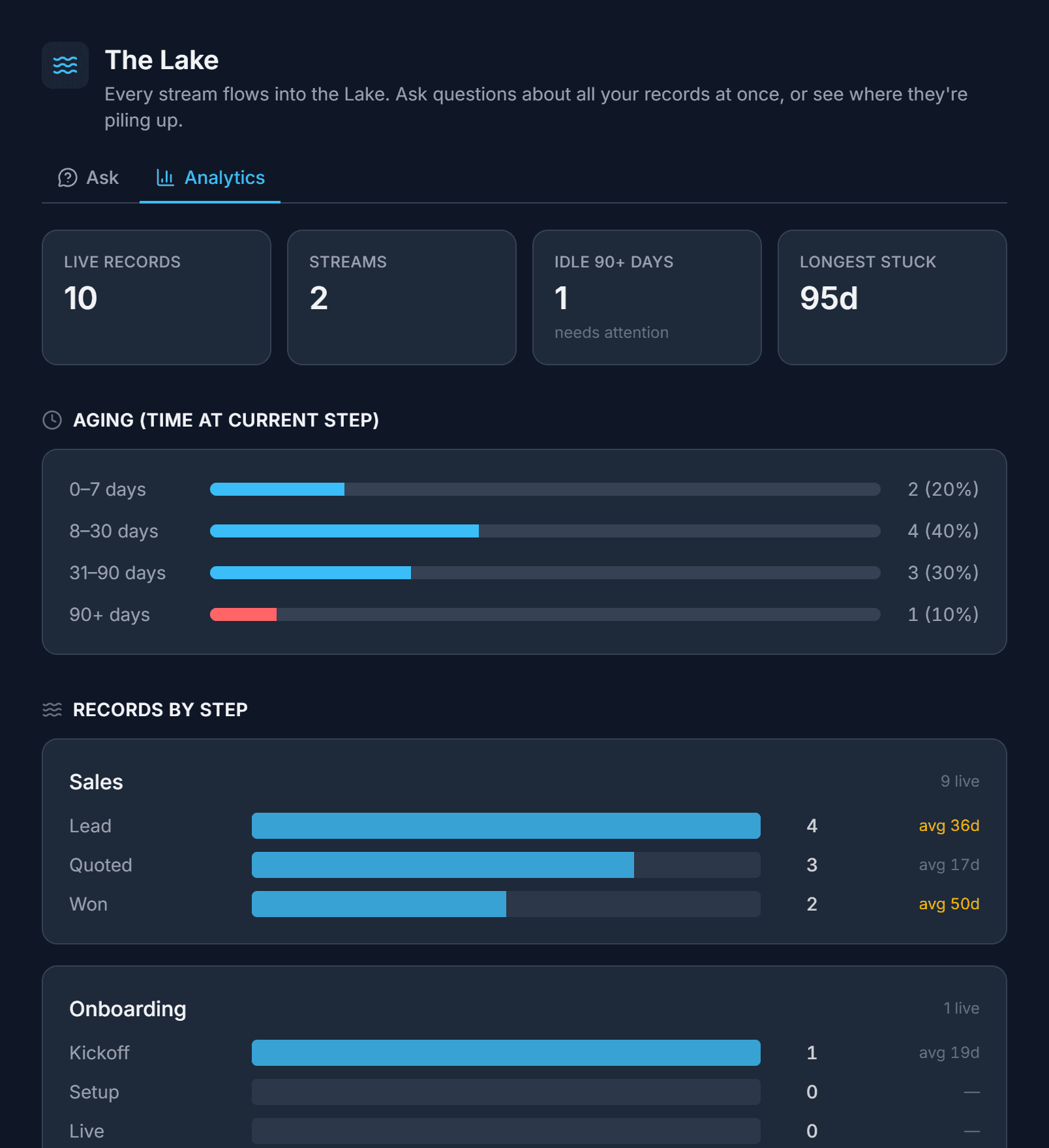
Spot bottlenecks instantly
A built-in analytics dashboard shows records by step, how long they sit at each one, and which have been stuck the longest. Instant, exact counts, free on every plan.
Why I built Streams
“I’ve worked across legal, politics, engineering and tech; every CRM I used forced my team to work around its structure. After years of bending our processes to fit someone else’s template, I built Streams to work the other way around.”
Pricing
Free to start. Tokens scale with you.
Every plan includes every plugin. Usage burns tokens from a monthly bucket. Bigger plans get more tokens at a lower per-token rate.
Token costs: 1 email = 1 token · 1 SMS = 30 · 1 OCR scan = 20 · 1 quote/invoice = 5. Need more? Buy a top-up: 1K tokens for $5, up to 100K for $250.
Write it down once. Then stop chasing it.
Start in minutes. No credit card required.