For events
The event can't move on until the venue is confirmed
With suppliers in group chats and deposits in someone's head, an event can be a week out before anybody notices the venue was never confirmed. Every planner has a version of that story.
No venue, no progress
The venue booking is required before an event can move on to suppliers.
Suppliers against the event
As many bookings as the event needs, each its own record, with a running total.
Accepted online, invoiced in one click
Clients accept the quote by link, and it becomes an invoice that syncs to your books.
The season at a glance
Event dates on a timeline, and anything stuck flagged by target days per stage.
Every event through the same stages
Write the process down once: enquiry, quote accepted, suppliers confirmed, event day, wrap-up. Every event moves through those stages, with the client, the date and the guest count captured at the start.
Each stage carries its own written instructions, so whoever is running an event reads what that stage needs while they are at it, not in a checklist somebody keeps on their desktop.
Confirmed means written down
Make the venue booking required on the quote accepted stage. An event cannot move to suppliers until somebody has written down which venue is confirmed. Try, and it stays where it is, with the missing field named.
Do the same for the caterer and the AV supplier on the next stage. The event cannot reach event day with a gap in it, because the stage before will not let it go.
Where one event has two suppliers and the next has nine, mark a supplier bookings stream as a sub-stream of your events. Each booking becomes its own record raised against the event, and the event keeps a running total of what has been booked.
Quote, deposit, invoice
Raise the quote off the event, with the GST worked out for you. The client opens a link and accepts by typing their name, and acceptance can move the event to the next stage by itself. Mark the deposit received when it lands.
Turn the accepted quote into an invoice in one click, at the figure they accepted. Connect Xero or QuickBooks and it goes across when you send it. When it is paid in Xero, the payment comes back.
See what is coming
Event dates plot onto a timeline, so the next three months are visible rather than reconstructed from a calendar and a spreadsheet.
Give each stage a target number of days. An event stuck waiting on a supplier is flagged, listed in the weekly summary, and emailed to whoever owns it the morning after it goes over.
See it happen
Is the venue actually booked? With suppliers in group chats and deposits in someone's head, an event can be a week out before anyone notices a gap. Here is how Fernquill Events runs event bookings as a stream: Enquiry → Quote accepted → Suppliers confirmed → Event day → Wrap-up, and nothing moves on until each step is done.
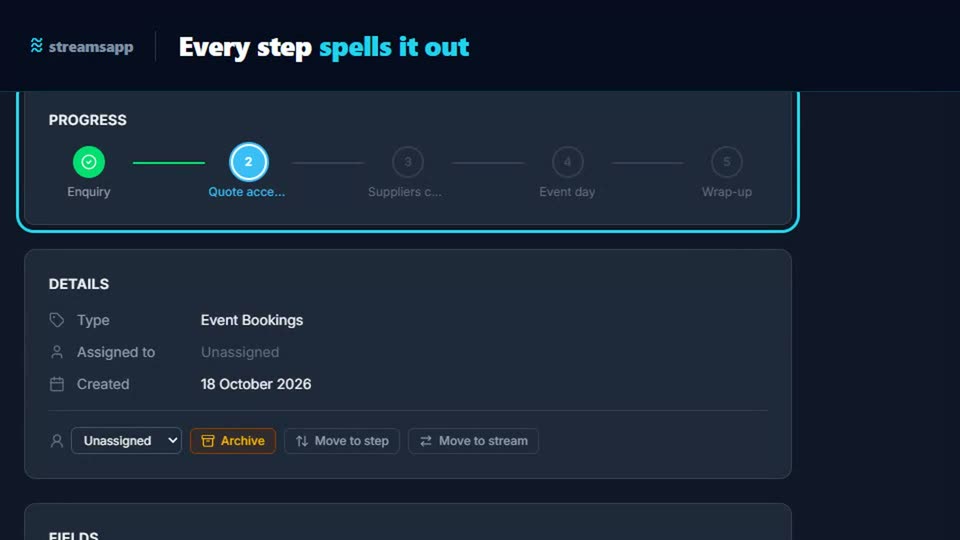
A starting point: the Event Bookings template
Run every event from enquiry through quote, venue, suppliers, the day itself and the final invoice. 6 stages and 18 fields, with written instructions on every stage. Change any of it, because it is your process.
Questions
- Can I stop an event progressing before the venue is confirmed?
- Yes. Make the venue a required field on the stage it belongs to. The event will not move on until it has a value, and the person moving it is told exactly which field is missing.
- Can a client accept a quote online?
- Yes. They get a link, read the quote with the GST broken out, and accept it by typing their name. Nothing to install and no account to create. The acceptance is recorded against the event with their name and the time.
- Can I track several suppliers per event?
- Yes. Give each supplier its own field on the suppliers stage or, if the number varies a lot, mark a supplier bookings stream as a sub-stream of your events so each booking is raised against a particular event.
- Does it sell tickets or take registrations?
- No. It runs each event as a job for your business, from enquiry to wrap-up. There is no public ticketing.
Weighing it up against
Other trades doing the same thing
Start with the free plan
Two users, 500 records and every feature switched on. No credit card, and your data stays in Australia.
Get started free