For customer support
No ticket closes without a fix written down
Support spread across shared inboxes has two failures. Somebody closes a ticket without actually fixing anything, and the next person to get the same question starts from nothing because the last fix was never written down.
No silent closes
The resolution is required before a ticket can be resolved, so every fix is written down.
Replies land on the ticket
Email, SMS and WhatsApp from the ticket, with replies coming back to it (and email attachments saved on it).
The right person told
The assignee hears about a reply. Unassigned tickets go to whoever you choose.
Waiting too long, visible
Target days per stage, a weekly summary, and an email the morning a ticket runs over.
One queue, with a stage for every ticket
Write the process down once: new, investigating, waiting on customer, resolved. Every ticket sits at exactly one of those stages, with an owner, so 'has anyone answered them' is a glance rather than a search through three inboxes.
Tickets are raised in Streams, imported from a spreadsheet, or posted in from a form on your website through the inbound API. The Support Tickets template creates the stages and fields in one click if you would rather not start blank.
Resolved means a resolution exists
Make the resolution a required field on the investigating stage. A ticket cannot move on until somebody has written down what was actually done: the replacement sent, the refund issued, the setting changed.
Make the closing name required on the last stage and every resolved ticket says who closed it. Over time that is a written record of every fix, searchable the next time the same problem turns up.
The conversation stays on the ticket
Email the customer from the ticket itself. Every email sent from a ticket carries a reply address naming it, so when the customer hits reply the answer lands back on that ticket, with any photos they attached saved onto it.
Whoever the ticket is assigned to is emailed that a reply arrived. If it is unassigned, you choose who hears about it: owners, admins, everyone, one named person, or any address.
Text can be sent from the ticket too, and WhatsApp within 24 hours of the customer messaging you. Replies to either come back onto it.
Nothing left waiting
Give each stage a target number of days. A ticket sitting at 'waiting on customer' or 'investigating' too long is flagged, listed in the weekly summary, and emailed to whoever owns it the morning after it goes over.
Turn on the customer portal and a customer can follow their own ticket step by step and reply from the page, with no password. You choose exactly which fields they see.
See it happen
Has anyone answered them? Support spread across shared inboxes means tickets get closed without a fix, and customers ask the same question twice. Here is how Trailmoss Outdoor Co runs support tickets as a stream: New → Investigating → Waiting on customer → Resolved, and nothing moves on until each step is done.
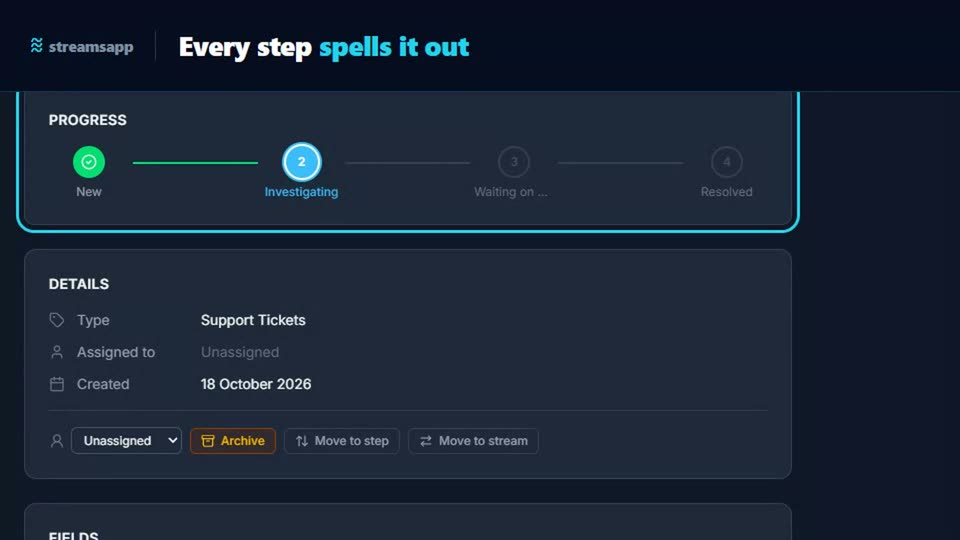
A starting point: the Support Tickets template
Track customer support tickets from intake through triage, work, and resolution. 5 stages and 6 fields, with written instructions on every stage. Change any of it, because it is your process.
Questions
- Can customers email an address to open a ticket?
- Not today. Tickets are raised in Streams, imported, or posted in from your website form through the inbound API. Once a ticket exists, every email sent from it brings the customer's reply back onto that ticket automatically.
- Can I stop a ticket being closed without a resolution?
- Yes. Make the resolution a required field on the stage before resolved. The ticket will not move on until it has a value, and the person moving it is told which field is missing.
- Who is told when a customer replies?
- The person the ticket is assigned to. If nobody is assigned, the organisation chooses who hears: owners, owners and admins, admins, everyone, one named person, or a typed address.
- Can customers see where their ticket is up to?
- Yes, with the customer portal switched on. They follow the ticket step by step through a private link in your emails, see only the fields you tick, and can reply from the page. It costs 30 tokens per customer per month while their access is on.
Weighing it up against
Other trades doing the same thing
Start with the free plan
Two users, 500 records and every feature switched on. No credit card, and your data stays in Australia.
Get started free