For it support and msps
Every client's tickets, and every fix written down
Small IT support businesses run on memory. Which client has the odd printer, what was done to the server last time, who is still waiting on a callback. It works until the one technician who remembers is on leave.
No fix, no close
The resolution is required before a ticket can be resolved, so every fix is written down.
History per client
Each client's contact record lists every ticket that names them.
Replies on the ticket
Email from the ticket and replies land back on it, with attachments saved.
Overdue tickets surface
Target days per stage, a weekly summary, and an email the morning a ticket runs over.
One queue across every client
Write the process down once: new, triage, in progress, waiting on client, resolved. Every ticket sits at exactly one stage, with the client, the user, the device and the priority captured where they belong.
Pick the client from your contacts when a ticket is raised, and each client's contact record lists every ticket that names them. Tickets are raised in the app, imported from a spreadsheet, or posted in from a form on your website through the inbound API.
Resolved means the fix is on record
Make the resolution and the technician's name required on the in progress stage. A ticket cannot be resolved until somebody has written down what was actually done. Try, and it stays where it is, with the missing field named.
Over time that is a written history of every fix for every client, searchable the next time the same problem turns up on the same machine.
The client conversation stays on the ticket
Email the client from the ticket. Every email sent from a ticket carries a reply address naming it, so their reply lands back on that ticket with any screenshots they attached saved onto it, and whoever the ticket is assigned to is told.
Turn on the customer portal and a client can follow their own tickets step by step and reply from the page, with no password. It costs 30 tokens per person per month while their access is on.
Nothing left waiting, then billed
Give each stage a target number of days. A ticket sitting too long is flagged, listed in the weekly summary, and emailed to whoever owns it the morning after it goes over.
Raise an invoice off a ticket with GST worked out per line, and connect Xero or QuickBooks so it goes across when you send it.
See it happen
Has anyone answered them? Support spread across shared inboxes means tickets get closed without a fix, and customers ask the same question twice. Here is how Trailmoss Outdoor Co runs support tickets as a stream: New → Investigating → Waiting on customer → Resolved, and nothing moves on until each step is done.
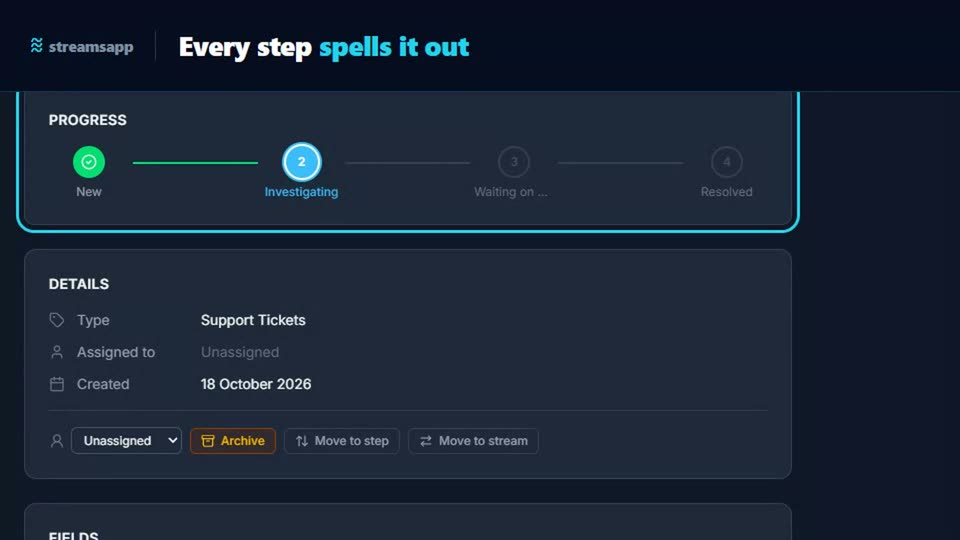
A starting point: the Support Tickets template
Track customer support tickets from intake through triage, work, and resolution. 5 stages and 6 fields, with written instructions on every stage. Change any of it, because it is your process.
Questions
- Can clients email an address to open a ticket?
- Not today. Tickets are raised in the app, imported, or posted in from your website form through the inbound API. Once a ticket exists, every email sent from it brings the client's reply back onto that ticket.
- Does it have SLA timers?
- Only in days. Each stage can have a target number of days, and a ticket past it is flagged and emailed to its owner the next morning. There are no response timers in hours or business-hours clocks.
- Is this a PSA or remote monitoring tool?
- No. There is no remote monitoring, device management, time tracking or contract billing built in. It runs the ticket process itself, from new to resolved, and makes sure nothing in between is skipped.
- Can clients see their own tickets?
- Yes, with the customer portal switched on. They follow their tickets through a private link in your emails, see only the fields you tick, and can reply from the page.
Weighing it up against
Other trades doing the same thing
Start with the free plan
Two users, 500 records and every feature switched on. No credit card, and your data stays in Australia.
Get started free